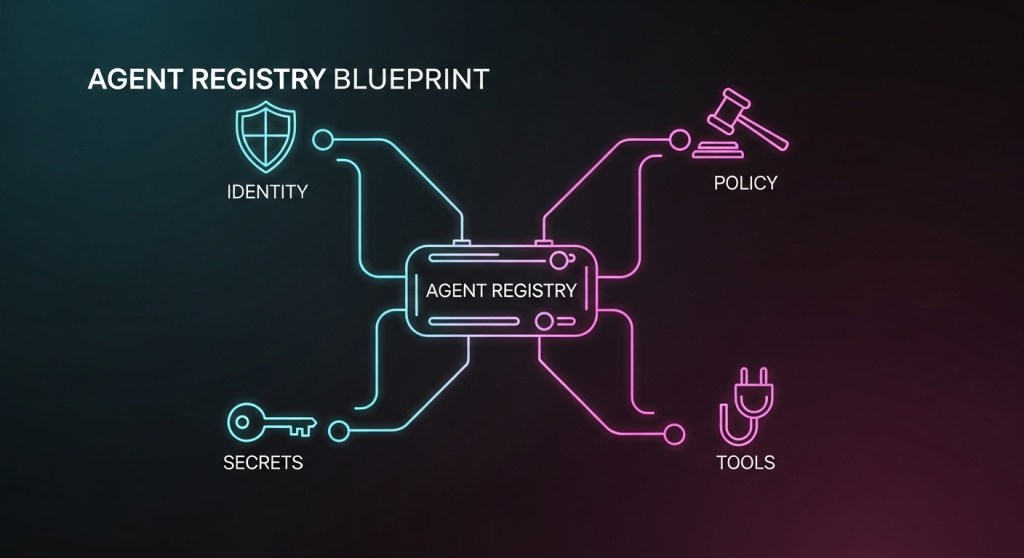
Quick plan (what you’ll get): A practical blueprint to ship an agent registry that plays nicely with MCP, A2A, OpenAI AgentKit, and Microsoft Agent 365. We’ll define the core data model, identity and RBAC, policy-as-code with OPA, secrets handling, audit/telemetry, and a 10‑step rollout plan with starter templates.
Why an agent registry—and why now?
Between November 18–20, 2025, Microsoft began promoting Agent 365 as the enterprise control plane for AI bots, complete with a registry and real-time security oversight (Wired). OpenAI is pushing a connector registry via AgentKit to standardize how agents attach to tools (TechCrunch). And Microsoft publicly aligned with Google’s cross‑vendor A2A standard so agents can collaborate across apps and clouds (TechCrunch). Amazon’s Nova Act underscores why browser‑capable agents need strong governance by default (TechCrunch).
Our own recent guides covered the safety and operations pieces—agent firewalls, agent CI/CD, reliability labs, and cost control—but a durable registry tying identity, capabilities, and policy together has been missing. This post fills that gap.
What is an agent registry?
An agent registry is a system of record that answers six questions about every agent:
- Who is it? (identity, ownership, lifecycle status)
- What can it do? (capabilities, tool bindings, environments)
- Where can it run? (prod/stage/dev, data residency)
- Which policies apply? (OPA/Rego packages, approval flows)
- How is it authenticated? (workload identity, secrets, rotation)
- How did it behave? (audit trail, traces, SLOs, cost budgets)
Design your registry so it works across vendor lines: MCP for tool connectivity (overview), A2A for cross‑agent collaboration (context), and enterprise control planes like Agent 365 (Wired).
The minimum viable agent registry (MVAR): 7 components
- Identity: Issue strong, short‑lived identities to agents and tools using SPIFFE/SPIRE—no static keys. Agents receive SPIFFE IDs and X.509/JWT‑SVIDs with automatic rotation (SPIRE concepts, use cases).
- Capabilities catalog: Declare what an agent may do (read‑only CRM, create tickets, refund below $100). Map to MCP servers and A2A actions. Keep prod/stage/dev bindings separate.
- Policy as code: Enforce RBAC, tool scoping, amounts, time windows, and PII rules using OPA/Rego; attach policies at agent, team, and environment scopes.
- Secrets: Store any residual credentials in a vault; prefer dynamic, short‑lived secrets and avoid environment variables. Follow HashiCorp’s programmatic best practices for rotation and guardrails (Vault best practices).
- Approvals: Define when a human must approve actions (refunds over $100, vendor wire changes, high‑risk prompts). Log who approved and why.
- Observability: Emit OpenTelemetry traces for every tool call and decision; persist to your APM; build dashboards tied to SLOs and budgets.
- Audit & cost: Record who/what/when for actions and prompts. Attach budgets and soft/hard limits per agent and team. Pipe into FinOps.
Starter schema (simplified)
{
  "agent_id": "urn:spiffe://yourco.dev/agents/cs-refunds",
  "owner": "support-platform@yourco.com",
  "env": "prod",
  "model": {"provider": "openai", "family": "o4-mini", "max_output": 2048},
  "capabilities": ["refund_initiate", "refund_status", "ticket_create"],
  "tools": [{"mcp_server": "zendesk"}, {"mcp_server": "stripe"}],
  "policy_packs": ["rbac/default", "pii/redaction", "refunds/limits"],
  "approvals": {"refund_threshold_usd": 100},
  "secrets": {"mode": "spiffe_svid", "fallback": "vault_dynamic"},
  "budgets": {"daily_usd": 50, "per_txn_usd": 0.50},
  "telemetry": {"otel_service": "agent.cs-refunds"}
}
Policy templates you can copy
1) Only allow read‑only CRM in prod unless on‑call approves
package rbac.crm

default allow = false

allow {
  input.env == "prod"
  input.tool == "crm.read"
}

allow {
  input.env == "prod"
  input.tool == "crm.write"
  input.approval.on_call == true
}
2) Block high‑risk browser actions for research‑preview agents (useful if testing Nova Act–style browser agents)
package browser.guardrails

default allow = false

# Allow navigation and read‑only scraping
allow { input.action in {"navigate", "extract"} }

# Never allow credential fields
deny { input.selector in {"input[type=password]", "#ssn"} }
How it fits with MCP, A2A, AgentKit, and Agent 365
- MCP: Treat MCP servers as first‑class tool bindings in your registry; attach Rego policies per server (e.g., which Zendesk fields can be read). Helpful explainer: ITPro.
- A2A: Store allowed external agents your agent can call and the allowed intents. This anticipates cross‑vendor agent workflows (TechCrunch).
- OpenAI AgentKit: Map AgentKit connectors to your capabilities catalog and enforce OPA checks before connector calls (TechCrunch).
- Agent 365: If you adopt Agent 365 as a control plane, sync your registry fields to its registry and runtime policy surfaces (see Wired coverage). Keep your canonical definitions in Git to stay vendor‑portable.
10‑step rollout plan (7–14 days)
- Pick scope: Start with one high‑leverage agent (e.g., order‑status + refunds under $100).
- Stand up identity: Deploy SPIRE; issue SPIFFE IDs to agents and MCP servers; delete any hardcoded tokens.
- Define the schema: Create a minimal JSON/YAML spec (like the example above). Store in Git.
- Wire policies: Add OPA sidecar/gateway; author two must‑have policies (RBAC and limits). Add a unit test per policy.
- Secrets strategy: Use dynamic secrets; rotate anything static; block env‑var credentials; follow Vault best practices.
- Attach tools: Register three MCP servers (CRM, ticketing, payments) and mark them read‑only by default.
- Approvals: Route high‑risk actions to human approvers in Slack/Teams with reason codes.
- Observability: Emit OpenTelemetry spans for prompts, tool calls, approvals, costs. Build a dashboard with SLOs.
- Gates in CI/CD: Fail deploys when registry, policy, or budget diffs aren’t approved. See our agent CI/CD guide.
- Chaos & red team: Run prompt‑injection drills and browser canary tests; verify your agent firewall catches them.
Governance tips (so you don’t relive someone else’s post‑mortem)
- Separate dev/stage/prod registries and require promotion gates. Never let a dev agent call prod tools.
- Default‑deny policies with explicit allow lists by environment.
- Short‑lived everything: identities, secrets, sessions. SPIFFE/SPIRE gives you this by design.
- Evidence packs: Auto‑export policy + telemetry + approvals each week for SOC 2/ISO audits.
- Budget alerts: Tie agent budgets to Slack/Email; throttle or pause agents automatically when exceeded. See our cost playbook.
Red flags to avoid
- Unverified agents or unknown tool bindings—a common failure mode highlighted by industry commentary (TNW).
- Browser agents without action whitelists or DOM element blocks; they will click the wrong things at the worst time.
- Human approval dark patterns—no reason code, no context, no audit trail.
Bottom line
As of November 20, 2025, the industry is aligning on registries and interoperability (Agent 365, A2A, AgentKit). Your move: implement a portable agent registry with SPIFFE identity, OPA policy, MCP/A2A‑aware tool bindings, and airtight auditability. Start with one agent, ship in 7–14 days, and expand with confidence.
Need help? HireNinja can help you stand up a production‑ready registry, policy packs, and telemetry in under two weeks—without breaking your roadmap. Get in touch or subscribe for more playbooks.
 HireNinja: Blog
Leave a comment