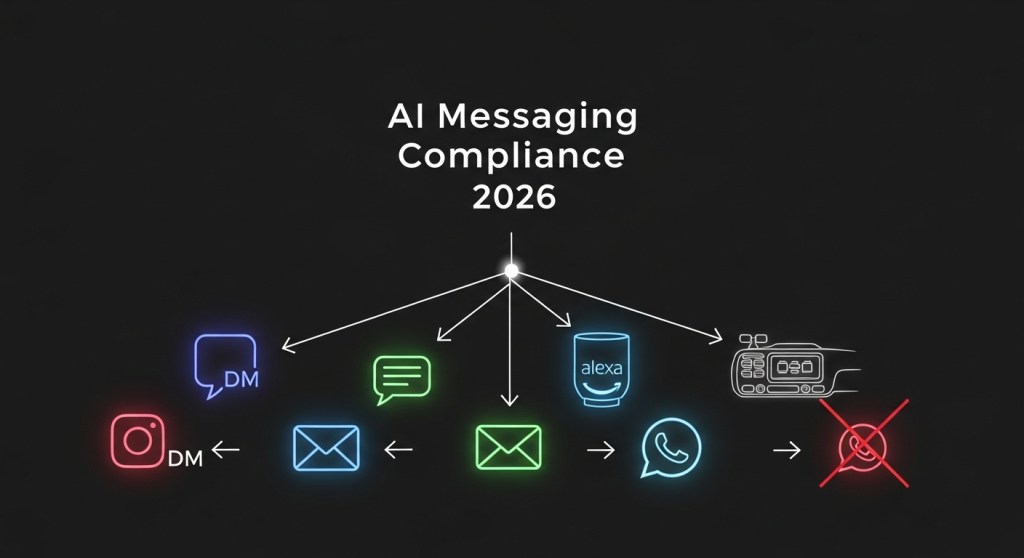
The 2026 AI Messaging Compliance Playbook: Surviving WhatsApp’s Jan 15 Bot Ban—and What to Ship Next
Updated: January 4, 2026 • For founders, e‑commerce teams, and support leaders
TL;DR: If your sales or support flows rely on WhatsApp bots, you need a compliant plan now. This guide gives you an actionable 48‑hour triage, multi‑channel migration patterns, governance guardrails, and measurement you can ship this week.
Note: This article shares practical guidance and is not legal advice. Work with counsel for your specific use case.
Why this matters now
Policy changes are tightening the rules on automated interactions in messaging apps. If your storefront, booking flow, or support triage is powered by an AI assistant inside WhatsApp, you risk outages, rate limits, or account penalties. The good news: you can protect revenue and even unlock new growth by moving the right parts of your flow to compliant channels—while keeping a great customer experience.
Your 48‑hour triage plan
- Inventory critical flows (60–90 min). List every WhatsApp automation: lead capture, product Q&A, order status, returns, appointment booking, abandoned cart, and payments. Mark each as Must‑Keep, Rebuild Later, or Defer.
- Choose compliant destinations (60 min). For each Must‑Keep flow, pick one or two channels: Instagram DM, web chat, email, SMS, Alexa+ voice booking, IVR, or in‑car assistants where appropriate.
- Ship minimal viable handoffs (2–4 hrs). Publish an auto‑reply on WhatsApp that (a) acknowledges the change, (b) offers two alternatives, and (c) deep‑links users there. Keep copy friendly and specific; examples below.
- Preserve consent & context (1–2 hrs). Port opt‑in records where allowed, and attach conversation history as metadata when you hand off to another channel or a human.
- Turn on measurement from day one (1 hr). Add UTMs and event tracking in your new flows so you can see drop‑off and revenue impact by channel.
- Publish a status note (30 min). Put a short banner on your site/support center explaining which channels are live and how to reach you now.
Recommended migration patterns (with examples)
Use these patterns to keep sales and support moving while staying within platform rules.
1) Sales and product discovery → Instagram DM + web chat
- Flow: WhatsApp auto‑reply → deep link to Instagram DM and on‑site web chat → quick carousel of products → collect email for follow‑up.
- Copy starter: “We’re moving to compliant channels. Tap here to continue in Instagram DM or use our web chat now.”
- Pro tip: Reuse your best responses and product cards. Keep replies under 3 lines and add one clear CTA per turn.
2) Bookings and appointments → Alexa+ voice booking
- Flow: Auto‑reply → Alexa+ → book via Square/Yelp/Expedia integration → confirmation email/SMS.
- How‑to: Follow our detailed guide to rank and convert in voice search and become bookable in days. See Alexa+ Local Booking SEO.
- Pro tip: Use location terms (“near me”, neighborhoods) and service qualifiers (“open now”, “walk‑in”) in your descriptions for higher voice intent capture.
3) Order status, returns, and FAQs → Email + web chat (human fallback)
- Flow: Auto‑reply → authenticated web chat for order lookup → smart triage → resolve or escalate to email ticket with full transcript.
- Instrumentation: Track Auth success, First contact resolution, Return started, and CSAT.
4) Car moments and hands‑free shopping → In‑car assistants
- Flow: Auto‑reply → send a link to an in‑car friendly page (big targets, 3 options max) → save to cart or schedule pickup.
- How‑to: Measure assistant funnels and attribute revenue from voice/car sessions with our blueprint: Assistant Analytics for 2026.
5) Abandoned cart nudges → Email (primary) + SMS (backup)
- Flow: Capture intent → email sequence with dynamic cart content → SMS reminder for opted‑in users → smart suppression when purchase completes.
- Pro tip: Keep nudges helpful, not spammy. Offer value (free size guide, fit quiz) before discounts.
For 12 ready‑to‑run migration patterns, see our full playbook: WhatsApp’s Jan 15 AI Bot Ban: 12 Migration Playbooks.
Compliance and governance guardrails (copy‑paste checklist)
- Transparent handoff: Clearly say why the channel is changing and what users can expect next.
- Consent continuity: Only reuse consent where permitted. Re‑capture consent when moving to a new channel.
- Data minimization: Pass only the fields needed to fulfill the task (order ID, ZIP, time window), not the whole transcript.
- Human‑in‑the‑loop: Provide a visible “Talk to a person” option within 2–3 steps.
- Safety rails: Rate‑limit outbound messages, cap retries, and suppress after resolution.
- Content policy controls: Filter risky intents and set escalation rules (e.g., medical, legal, financial).
- Auditability: Log model prompts, versions, and decisions that affect customers. Keep a 30–90 day retention policy aligned with your privacy policy.
Measure what matters from day one
Don’t wait to retrofit analytics. Instrument the new flows with a simple event model:
- Session start (channel, source UTM)
- Step complete (intent → state, e.g., Return.Started)
- Human takeover (reason code)
- Conversion (sale, booking, refund, NPS/CSAT)
- Attribution (original channel → assist credit)
Use our blueprint with examples for Shopify and WooCommerce: Assistant Analytics for 2026.
E‑commerce playbook: scripts you can ship today
Auto‑reply (WhatsApp → alternatives)
“We’re moving our automated help to compliant channels. Continue in Instagram DM or use our web chat. For orders, reply with your email and we’ll send a secure lookup link.”
Voice booking prompt (Alexa+)
“Alexa, book a cleaning with [Brand].” Add business hours, neighborhoods, and popular services to your profile. For more voice tips, see Assistant SEO for 2026 and Alexa+ Local Booking SEO.
Order lookup (web chat)
“What’s your email or order number?” → validate → “Found it. Would you like delivery updates, a return label, or help picking a different size?”
Returns choice architecture
- Option A: “Instant exchange” (ship new size now)
- Option B: “Store credit + 10% bonus”
- Option C: “Refund to original payment”
Team owner map (who does what this week)
- Product: Decide the minimum viable flows per channel and ship copy.
- Engineering: Wire deep links, event tracking, and data minimization rules.
- Marketing: Update site banners, email templates, and FAQ pages.
- Support: Define takeover rules, macros, and escalation SLAs.
- Legal: Review consent wording and retention schedules.
- Ops: QA bookings/payments/refunds end‑to‑end in the new channels.
Ship faster with HireNinja
HireNinja helps teams migrate and scale compliant AI assistants across channels in days, not months.
- Prebuilt flows for bookings, order status, returns, and subscriptions.
- Connectors for Shopify, WooCommerce, Square, Yelp, and email/SMS tools.
- Built‑in guardrails: consent capture, logging, redaction, and rate limits.
- Assistant analytics out of the box: UTMs, funnels, revenue attribution.
Final checklist
- Publish a WhatsApp auto‑reply with two compliant alternatives.
- Stand up Instagram DM + web chat for sales and support triage.
- Enable Alexa+ booking if you sell time‑based services.
- Instrument UTMs and events before traffic arrives.
- Turn on human takeover and log consent everywhere.
 HireNinja: Blog
Leave a comment