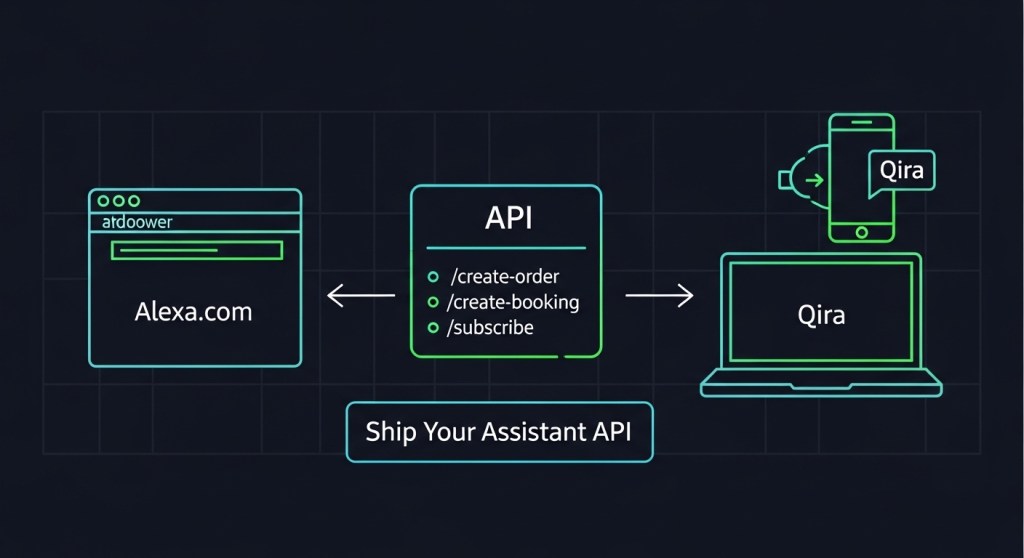
Ship an Assistant Action API in a Weekend: Alexa.com, Lenovo Qira, and Desk AI
Founders and e‑commerce operators: assistants became a real channel this week. Here’s the fastest way to make your product or service actionable on Alexa.com (web), Lenovo Qira (cross‑device), and on‑desk companions—without rebuilding your stack.
Checklist: what we’ll do
- Map 3–5 high‑intent actions you want assistants to complete.
- Stand up a lightweight Action API:
/create-order,/create-booking,/subscribe. - Add assistant‑ready structured data (JSON‑LD) to key pages.
- Build assistant landing pages for clean hand‑offs.
- Instrument attribution (UTMs + events) and ship consent‑first flows.
Why this matters now
With Alexa+ expanding to the web via Alexa.com and Lenovo launching Qira to follow users across PC, phone, and wearables, assistants can now do more than answer questions—they can complete tasks. If your business exposes clear actions and machine‑readable data, you’ll rank, convert, and attribute before competitors catch up.
For broader strategy and positioning, see our recent posts:
Assistant App Store Optimization (AASO),
7‑Day E‑Commerce Playbook, and
Attribution & Conversion Plan.
Step 1: Choose your first 3 actions
Pick actions with clear value, low ambiguity, and fast fulfillment:
- Order: reorder a SKU, buy a bundle, upgrade a plan.
- Booking: reserve a consult, demo, or in‑store service.
- Subscription: start, pause, or change quantity/frequency.
Define the minimum inputs each action needs and the confirmation you’ll return. Assistants reward merchants that complete in one pass.
Step 2: Stand up a lightweight Action API
You don’t need a massive microservice. A weekend‑friendly Express service or serverless function works. Start with these endpoints and contracts.
Endpoints
POST /api/assistant/create-orderPOST /api/assistant/create-bookingPOST /api/assistant/subscribeGET /api/assistant/availability(optional, for bookings)
Request/response contracts
{
// POST /api/assistant/create-order
"customer": {"email": "ana@example.com", "name": "Ana"},
"items": [{"sku": "GEL-3PK", "qty": 1}],
"payment": {"method": "apple_pay|google_pay|square|card_on_file"},
"shipping": {"addressId": "addr_123"},
"context": {"source": "alexa", "intent": "reorder", "campaign": "winter_promo"}
}
---
{
  "orderId": "ord_98765",
  "status": "confirmed",
  "total": 29.00,
  "currency": "USD",
  "next": {"trackingUrl": "https://example.com/track/ord_98765"}
}

// POST /api/assistant/create-booking
{
  "customer": {"email": "ana@example.com"},
  "serviceId": "BIKE_FIT_30",
  "slot": "2026-01-16T14:00:00-05:00",
  "payment": {"method": "square", "deposit": 20},
  "context": {"source": "qira", "intent": "book_consult"}
}
---
{
  "bookingId": "bk_22334",
  "status": "confirmed",
  "calendarUrl": "https://calendar.example.com/i/bk_22334"
}

// POST /api/assistant/subscribe
{
  "customer": {"email": "ana@example.com"},
  "sku": "VITAMIN-C-90",
  "frequency": "30d",
  "quantity": 1,
  "context": {"source": "desk_ai"}
}
---
{
  "subscriptionId": "sub_1122",
  "status": "active",
  "nextCharge": "2026-02-16"
}
Example: Express stub you can paste
import express from "express";
const app = express();
app.use(express.json());

const ok = (data) => ({ ok: true, ...data });

app.post("/api/assistant/create-order", (req, res) => {
  // TODO: validate, price, charge (Square/Stripe), create order
  const orderId = `ord_${Date.now()}`;
  return res.json(ok({ orderId, status: "confirmed", total: 29.0, currency: "USD" }));
});

app.post("/api/assistant/create-booking", (req, res) => {
  const bookingId = `bk_${Date.now()}`;
  return res.json(ok({ bookingId, status: "confirmed", calendarUrl: "https://example.com/cal" }));
});

app.post("/api/assistant/subscribe", (req, res) => {
  const subscriptionId = `sub_${Date.now()}`;
  return res.json(ok({ subscriptionId, status: "active", nextCharge: "2026-02-16" }));
});

app.get("/api/assistant/availability", (req, res) => {
  // return next 10 open slots
  const slots = Array.from({ length: 10 }, (_, i) => new Date(Date.now() + i*3600000).toISOString());
  return res.json(ok({ slots }));
});

app.listen(8080, () => console.log("Assistant API running on :8080"));
Integrate your real catalog, pricing, and payment later. What matters first is a reliable contract assistants can call and a clear confirmation object.
Step 3: Add assistant‑ready structured data (JSON‑LD)
Assistants parse your pages before they call your API. Add JSON‑LD to your top product and service pages:
<script type="application/ld+json">{
  "@context": "https://schema.org",
  "@type": "Product",
  "name": "Energy Gel 3‑Pack",
  "sku": "GEL-3PK",
  "brand": {"@type": "Brand", "name": "Acme"},
  "image": ["https://example.com/img/gel.jpg"],
  "offers": {
    "@type": "Offer",
    "price": "29.00",
    "priceCurrency": "USD",
    "availability": "https://schema.org/InStock",
    "url": "https://example.com/gel-3pk?utm_source=alexa&utm_medium=assistant"
  }
}</script>
For services, use Service with areaServed, provider, and a booking URL. Add FAQPage and HowTo where relevant—assistants love concise Q/A and steps.
Step 4: Build assistant landing pages for clean hand‑offs
Sometimes an assistant must hand off to the web. Create fast, minimal pages that mirror the request and prefill context from query params:
- Headline mirrors intent: “Reserve a 30‑min consult for Tuesday at 2 PM.”
- Prefill date/SKU/quantity from params.
- Support Apple Pay/Google Pay/Shop Pay/Square for sub‑15‑second checkout.
- Above‑the‑fold trust: guarantees, refund, and a one‑line privacy statement.
See our 7‑Day Playbook for templates.
Step 5: Instrument attribution and events
Add UTMs and a dedicated medium so you can segment assistant traffic from day one:
?utm_source=alexa&utm_medium=assistant&utm_campaign=q1_launch&utm_intent=reorderLog completion events in GA4 and your CRM:
{
  "event": "assistant_action_completed",
  "source": "alexa|qira|desk_ai",
  "intent": "reorder|book_consult|subscribe",
  "objectId": "ord_98765",
  "value": 29,
  "currency": "USD"
}
Tie events to user consent and order IDs so legal, analytics, and support all agree on the same truth. For a deeper dive on policy, read our
Consent‑First AI (48‑Hour Playbook).
Step 6: Privacy, consent, and security in one sitting
- Consent copy: one sentence the assistant can read aloud: “We use your data to complete your order and send confirmations; see full policy at /privacy.”
- Scopes: collect only what the action needs (email, slot, SKU). Avoid fishing for extra PII.
- Auth: if you must authenticate, use short‑lived magic links or OAuth device code flow. Don’t derail the session.
- Rate limits & retries: return idempotent confirmations; assistants may retry.
- Observability: log
requestId,intent,latencyMs,result.
Step 7: Test like an assistant
Simulate real flows with cURL or Postman. Aim for < 400 ms P95 on reads and < 800 ms P95 on writes.
curl -X POST https://api.yoursite.com/api/assistant/create-order \
 -H 'Content-Type: application/json' \
 -d '{"customer":{"email":"ana@example.com"},"items":[{"sku":"GEL-3PK","qty":1}],"payment":{"method":"square"},"context":{"source":"alexa","intent":"reorder"}}'
Then confirm the order lands in your OMS, the attribution appears in analytics, and the confirmation includes a help link.
Go‑live checklist (Sunday evening)
- Expose endpoints and confirm CORS for assistant origins.
- Publish JSON‑LD on top 25 SKUs/services. Validate with a structured data tester.
- Create three assistant landing pages (consult, top bundle, reorder).
- Tag UTMs, wire events, and sanity‑check dashboards.
- Record a 20–30s explainer clip per action for assistants that surface video.
- Run a 10‑user test on Alexa.com and a Lenovo PC/phone running Qira; fix the first two bottlenecks you find.
Real‑world examples you can copy
- “Reorder my 3‑pack energy gels” → confirm with Apple Pay/Square, send tracking link, offer a 30‑day subscription upsell.
- “Book a 15‑minute bike fit on Friday” → show two nearest slots, capture deposit, add calendar invite with location.
- “Upgrade me to Pro” → proration summary, confirm next billing date, email receipt + change log.
Need a shortcut?
If you’d rather not wire this from scratch, HireNinja can ship the essentials fast:
- Assistant‑ready product feed (auto JSON‑LD + availability API).
- Action endpoints for order, booking, and subscription with confirmations.
- Attribution kit (UTMs, event schema, dashboards) and consent templates.
Talk to HireNinja and make your catalog assistant‑ready this week.


Leave a Reply